
Install the app
How to install the app on iOS
Follow along with the video below to see how to install our site as a web app on your home screen.
Note: This feature may not be available in some browsers.
You are using an out of date browser. It may not display this or other websites correctly.
You should upgrade or use an alternative browser.
You should upgrade or use an alternative browser.

- Aug 17, 2016
- 620
- 3,465
With v3.029, the SEP picture translation engine now also has limited support for translating vertical text.
I say limited because you'll have to tilt your head 90° to read it.

Changelog since last changelog post:
(I noticed I didn't actually make one since v3)
3.029
SEP
Added support for vertical text.
Improved background fill further.
3.028
SEP
changed the solid background fill to more closely fit the detected text boxes.
3.027
Made project saving a lot more robust. It already made backups, but now it will make an additional verification.
SEP
Added options to allow replacing text with itself if someone wants to do that for whatever reason.
3.026
It will now convert file paths to UTF-8 before spawning ruby, fixing Windows system locale issues.
3.025
Improved SEP handling of solid backgrounds and added a font color detection option.
3.024
Added new logic to send scenes with only a single text box in their own bigger batches.
Fixed config.json, again. This time it should actually properly load everything even if it was only generated this session.
3.023
Fixed an issue that caused wrong tagging if the tool is launched without an already generated config.json
3.022
It will now only close the UI if all processes are finished.
ETA system now works for multiple requests at the same time.
3.021
Added compression to log files so they don't take up unreasonable amounts of space.
Added code comments and readme files to make it more obvious to someone besides me how the heck this project is structured.
3.020
It will now translate large scenes first and grouped scenes will actually be grouped to their limits.
The Batch Translator will now try to estimate how long the batch translation will take.
This is only a very rough estimate and will not work if multiple batches are sent at the same time.
Removed token summaries for every individual batch from the UI (They are still in the console), and instead added a final token summary for the entire batch translation.
3.019
More adjustments to the validation system.
3.018
Improved Batch Validation.
Fixed a pointless error showing up in the console.
3.017
Changed DSLR limit options and how batch translation works.
Fixed the options menu process sometimes not being correctly killed and just running in the backround endlessly.
3.016
Fixed new option merge breaking the Batch Translation button.
Improved Glossary LLM request system.
Removed some dead bloat from the Linux version.
3.015
Merged the Project Summary system into DSLR Glossary because it doesn't make sense to have 2 editors for the same context.
Changed default translator to DSLR.
Fixed some problems with the options menu.
3.014
Improved Project Summary to collect less useless information.
3.013
Project Summary: auto-generated at creation, view/edit button, persistence in .slrproj, context injection with unified budget
Unified context budget: summary/scene/glossary share one maxContextLength budget, trimmed by priority
Scene Graph panel: draggable, behind menus (z-8500), hidden during loading
SLR collapsible sections: fixed
GlossaryExtractor _getDslrEngine: fixed (same registry bug)
3.012
General cleanup of obsolete code.
3.011
DSLR
Added better reasoning support.
It will now show token progress of requests.
3.010
Fixed DSLR option presets and null parameters.
Fixed SEP jpg/jpeg support and added bmp, webp, tga and pcx support.
Improved handling of transparent images.
Fixed min font size option.
3.009
Added Scene Graph system.
It will now trace scenes across the files and build context for them.
Batches sent to a translator will now only include full scenes unless they cannot fit in given restraints.
It will automatically add a scene context block to those scenes.
You can limit how much context is added based on the context length on your model. If you do not set the option it will always send the full context.
Fixed some minor bugs and removed dead code.
3.008
Added new Raw window to SEP that shows where the text was collected from the original image and OCR confidence.
Added override commands to set text erasure method for specific rows.
Removed pointless tts function.
3.007
Improved Linux distro compatibility.
Added small documentation for SEP.
DSLR
Made "Response is too long" and "Response is too short" reject reasons more lenient.
3.006
Added aot-inpainting and LaMa options for text erasure to SEP.
Removed obsolete Blank project option.
3.005
Included first prototype of the SEP ONNX remake.
Fixed broken project creation in the windows version.
3.004
Fixed romaji and dictionary features.
Fixed some wrong colors.
Changed Raw tab.
3.003
Fixed non Japanese cell tagging.
3.002
Fixed a bug preventing glossary creation.
3.001
Added option to import translations from other slrpoj files.
Removed broken spreadsheet import option.
fixed a bug in the bracket preservation system.
Cleaned up a lot of regex.
3.000
Removed or refactored all leftover T++ code.
I changed the UI backend and rendering. Objects are now pre-rendered and cached, drastically improving performance.
De-duplication is now completely removed and as a result there is no SLRContextID anymore.
The parsers now collect string numbers and integers in new "num" tag rows. Allowing for easy font changes in MV/MZ.
The Prepare Project for Batch translation button was removed and is instead ran automatically on project creation.
The Fix Cells and Check for Errors button was removed it will instead now run it immediately during translation and only on the cells that were actually translated. This now also means it works on destinations other than [1].
Error codes will now not be put into the translation, but instead copied with the codes into a new Error[4] column.
Overwrite is now [5].
Collected plugins will no longer include strings that are modified by the plugins.js, since changing them would just break stuff for no reason.
It is now possible to insert ruby code at the start of Main in VX and VXAce Scripts to insert stuff like Font.default_size values.
Fixed OOM crashes for exporting extremely large VX/VXAce games.
Fixed inefficient parsing logic, VX/VXAce parsing is now 17x faster.
Implemented automatic logs of the last 3 sessions (saved to data>logs) that uncollapse all console log entries. So that you can read the console log even if the tool crashed so badly that it just closed itself. (Can be turned off in options)
Rebuilt the options menu and removed obsolete or useless options.
Added an automatic spellchecker. (Can be turned off.)
Replaced trans format with compressed much more complete slrproj.
Made project creation for certain titles more convenient.
Linux version is no longer an afterthought, it has ALL features of the windows version.
Removed a lot of obsolete code and files.
I say limited because you'll have to tilt your head 90° to read it.
Changelog since last changelog post:
(I noticed I didn't actually make one since v3)
3.029
SEP
Added support for vertical text.
Improved background fill further.
3.028
SEP
changed the solid background fill to more closely fit the detected text boxes.
3.027
Made project saving a lot more robust. It already made backups, but now it will make an additional verification.
SEP
Added options to allow replacing text with itself if someone wants to do that for whatever reason.
3.026
It will now convert file paths to UTF-8 before spawning ruby, fixing Windows system locale issues.
3.025
Improved SEP handling of solid backgrounds and added a font color detection option.
3.024
Added new logic to send scenes with only a single text box in their own bigger batches.
Fixed config.json, again. This time it should actually properly load everything even if it was only generated this session.
3.023
Fixed an issue that caused wrong tagging if the tool is launched without an already generated config.json
3.022
It will now only close the UI if all processes are finished.
ETA system now works for multiple requests at the same time.
3.021
Added compression to log files so they don't take up unreasonable amounts of space.
Added code comments and readme files to make it more obvious to someone besides me how the heck this project is structured.
3.020
It will now translate large scenes first and grouped scenes will actually be grouped to their limits.
The Batch Translator will now try to estimate how long the batch translation will take.
This is only a very rough estimate and will not work if multiple batches are sent at the same time.
Removed token summaries for every individual batch from the UI (They are still in the console), and instead added a final token summary for the entire batch translation.
3.019
More adjustments to the validation system.
3.018
Improved Batch Validation.
Fixed a pointless error showing up in the console.
3.017
Changed DSLR limit options and how batch translation works.
Fixed the options menu process sometimes not being correctly killed and just running in the backround endlessly.
3.016
Fixed new option merge breaking the Batch Translation button.
Improved Glossary LLM request system.
Removed some dead bloat from the Linux version.
3.015
Merged the Project Summary system into DSLR Glossary because it doesn't make sense to have 2 editors for the same context.
Changed default translator to DSLR.
Fixed some problems with the options menu.
3.014
Improved Project Summary to collect less useless information.
3.013
Project Summary: auto-generated at creation, view/edit button, persistence in .slrproj, context injection with unified budget
Unified context budget: summary/scene/glossary share one maxContextLength budget, trimmed by priority
Scene Graph panel: draggable, behind menus (z-8500), hidden during loading
SLR collapsible sections: fixed
GlossaryExtractor _getDslrEngine: fixed (same registry bug)
3.012
General cleanup of obsolete code.
3.011
DSLR
Added better reasoning support.
It will now show token progress of requests.
3.010
Fixed DSLR option presets and null parameters.
Fixed SEP jpg/jpeg support and added bmp, webp, tga and pcx support.
Improved handling of transparent images.
Fixed min font size option.
3.009
Added Scene Graph system.
It will now trace scenes across the files and build context for them.
Batches sent to a translator will now only include full scenes unless they cannot fit in given restraints.
It will automatically add a scene context block to those scenes.
You can limit how much context is added based on the context length on your model. If you do not set the option it will always send the full context.
Fixed some minor bugs and removed dead code.
3.008
Added new Raw window to SEP that shows where the text was collected from the original image and OCR confidence.
Added override commands to set text erasure method for specific rows.
Removed pointless tts function.
3.007
Improved Linux distro compatibility.
Added small documentation for SEP.
DSLR
Made "Response is too long" and "Response is too short" reject reasons more lenient.
3.006
Added aot-inpainting and LaMa options for text erasure to SEP.
Removed obsolete Blank project option.
3.005
Included first prototype of the SEP ONNX remake.
Fixed broken project creation in the windows version.
3.004
Fixed romaji and dictionary features.
Fixed some wrong colors.
Changed Raw tab.
3.003
Fixed non Japanese cell tagging.
3.002
Fixed a bug preventing glossary creation.
3.001
Added option to import translations from other slrpoj files.
Removed broken spreadsheet import option.
fixed a bug in the bracket preservation system.
Cleaned up a lot of regex.
3.000
Removed or refactored all leftover T++ code.
I changed the UI backend and rendering. Objects are now pre-rendered and cached, drastically improving performance.
De-duplication is now completely removed and as a result there is no SLRContextID anymore.
The parsers now collect string numbers and integers in new "num" tag rows. Allowing for easy font changes in MV/MZ.
The Prepare Project for Batch translation button was removed and is instead ran automatically on project creation.
The Fix Cells and Check for Errors button was removed it will instead now run it immediately during translation and only on the cells that were actually translated. This now also means it works on destinations other than [1].
Error codes will now not be put into the translation, but instead copied with the codes into a new Error[4] column.
Overwrite is now [5].
Collected plugins will no longer include strings that are modified by the plugins.js, since changing them would just break stuff for no reason.
It is now possible to insert ruby code at the start of Main in VX and VXAce Scripts to insert stuff like Font.default_size values.
Fixed OOM crashes for exporting extremely large VX/VXAce games.
Fixed inefficient parsing logic, VX/VXAce parsing is now 17x faster.
Implemented automatic logs of the last 3 sessions (saved to data>logs) that uncollapse all console log entries. So that you can read the console log even if the tool crashed so badly that it just closed itself. (Can be turned off in options)
Rebuilt the options menu and removed obsolete or useless options.
Added an automatic spellchecker. (Can be turned off.)
Replaced trans format with compressed much more complete slrproj.
Made project creation for certain titles more convenient.
Linux version is no longer an afterthought, it has ALL features of the windows version.
Removed a lot of obsolete code and files.

Ragingpeanut
New member
- Feb 24, 2024
- 5
- 4
- Aug 17, 2016
- 620
- 3,465
I've released v3.038.

Most notable change, I've added new option to add as many primary endpoints as you want.
And instead of using the concurrency setting in General there's now a "weight" option for the primary endpoints that decides how many concurrent requests can be made to each endpoint.
The purpose is definitely not to abuse free limits by having 50 accounts for something.
*wink wink nudge nudge*
Changelog since last Changelog post:
3.038
Added option for alternate concurrent Primary endpoints.
You can now add as many endpoints as you want and give them a weight setting.
The weight setting is how many concurrent requests the endpoint allows and it will route requests based on that.
Meaning if you have 3 endpoints, the first with 2 weight and the other two with a weight of 1, it will make 4 requests at the same time using all three endpoints and the first twice.
Added option to clear all Error[4] cells, just type "ignoreallerrors" into the field for word wrapping.
Error checks now also happen during translations done with the right click menu or the shortcut.
Added 2 new error codes for screwed up commands.
Cells can now have multiple error codes instead of just the last.
Fixed a typo in the MTLTextProcessor module.
3.037
Reworked DSLR Fallback system.
Fixed some DSLRTranslationEngineWrapper patterns.
Fixed a very niche batch validation bug.
3.036
Improved DSLRGlossary server error handling.
3.035
Added new DSLRGlossary option to change the response format to be compatible with official DeepSeek. (Or other providers that do not like JSON schemas.)
Added "additionalProperties: false" to the JSON schema to support some very specific stupid endpoints.
Changed first DSLR preset to a Nano-GPT DeepSeek V4 Flash 731.
3.034
Fixed a typo in the DSLR chain meant to try to fix broken responses.
3.033
Added fixing of \[] commands in JSON Full Batch and the DSLRGlossary if the model screws up the JSON and for example thinks that \n[1] is a linebreak.
Fixed DSLRGlossary requests not using the custom command replacements.
3.032
Added the automatic response trimming of DSLR to the DSLRGlossary response parsing to try to fix LLM JSON fuckups.
3.031
SEP
It will now try to detect low contrast environments and add an outline to drawn text if it would otherwise be hard to read.
3.030
SEP
Improved support for text erasure on semi transparant images.
Improved text color detection.
A single space now deletes the original text without drawing new text.
Spaces at the start will now be correctly applied.
(Used to only work with IDSP)
Most notable change, I've added new option to add as many primary endpoints as you want.
And instead of using the concurrency setting in General there's now a "weight" option for the primary endpoints that decides how many concurrent requests can be made to each endpoint.
The purpose is definitely not to abuse free limits by having 50 accounts for something.
*wink wink nudge nudge*
Changelog since last Changelog post:
3.038
Added option for alternate concurrent Primary endpoints.
You can now add as many endpoints as you want and give them a weight setting.
The weight setting is how many concurrent requests the endpoint allows and it will route requests based on that.
Meaning if you have 3 endpoints, the first with 2 weight and the other two with a weight of 1, it will make 4 requests at the same time using all three endpoints and the first twice.
Added option to clear all Error[4] cells, just type "ignoreallerrors" into the field for word wrapping.
Error checks now also happen during translations done with the right click menu or the shortcut.
Added 2 new error codes for screwed up commands.
Cells can now have multiple error codes instead of just the last.
Fixed a typo in the MTLTextProcessor module.
3.037
Reworked DSLR Fallback system.
Fixed some DSLRTranslationEngineWrapper patterns.
Fixed a very niche batch validation bug.
3.036
Improved DSLRGlossary server error handling.
3.035
Added new DSLRGlossary option to change the response format to be compatible with official DeepSeek. (Or other providers that do not like JSON schemas.)
Added "additionalProperties: false" to the JSON schema to support some very specific stupid endpoints.
Changed first DSLR preset to a Nano-GPT DeepSeek V4 Flash 731.
3.034
Fixed a typo in the DSLR chain meant to try to fix broken responses.
3.033
Added fixing of \[] commands in JSON Full Batch and the DSLRGlossary if the model screws up the JSON and for example thinks that \n[1] is a linebreak.
Fixed DSLRGlossary requests not using the custom command replacements.
3.032
Added the automatic response trimming of DSLR to the DSLRGlossary response parsing to try to fix LLM JSON fuckups.
3.031
SEP
It will now try to detect low contrast environments and add an outline to drawn text if it would otherwise be hard to read.
3.030
SEP
Improved support for text erasure on semi transparant images.
Improved text color detection.
A single space now deletes the original text without drawing new text.
Spaces at the start will now be correctly applied.
(Used to only work with IDSP)
- Aug 17, 2016
- 620
- 3,465
I've released v3.039.
I've made the multiple primary endpoints system smarter and added options for odd providers.
Changelog:
3.039
Added new server error handling for multiple endpoints.
If there's a 401, 403, or 404 error that endpoint will be blacklisted for the session and not used.
If there's a 429 the endpoint will be given an escalating cooldown. (10s, 30s, 1m, 2m, 5m, 15m, 30m capped at 30m.)
The endpoint will be skipped during the cooldown, if it succeeds a request the colldown resets to 10s.
Added option (default off) to group primary endpoints by URL, in case a provider actually cares about concurrent connections from the same IP.
When endpoints are grouped only the highest weight setting is used for concurrency, but even if set to 1 they still rotate each batch to be used evenly.
If an error forces rotation it will wait a minimum of 5s (customizable) before making the next request to avoid hitting the same endpoint immediately with a different key, in case a specific provider doesn't like that.
Moved +Add Endpoint button location to make more sense.
I've made the multiple primary endpoints system smarter and added options for odd providers.
Changelog:
3.039
Added new server error handling for multiple endpoints.
If there's a 401, 403, or 404 error that endpoint will be blacklisted for the session and not used.
If there's a 429 the endpoint will be given an escalating cooldown. (10s, 30s, 1m, 2m, 5m, 15m, 30m capped at 30m.)
The endpoint will be skipped during the cooldown, if it succeeds a request the colldown resets to 10s.
Added option (default off) to group primary endpoints by URL, in case a provider actually cares about concurrent connections from the same IP.
When endpoints are grouped only the highest weight setting is used for concurrency, but even if set to 1 they still rotate each batch to be used evenly.
If an error forces rotation it will wait a minimum of 5s (customizable) before making the next request to avoid hitting the same endpoint immediately with a different key, in case a specific provider doesn't like that.
Moved +Add Endpoint button location to make more sense.
- Aug 17, 2016
- 620
- 3,465
I've released v3.041.
Added support for "/v1/responses" format endpoints.
I DO NOT RECOMMEND THAT ANYONE ACTUALLY USES THEM.
Not only are they strictly a worse format than /chat/completions even if they were working properly, but they are an outright scam right now.
Probably a scam that can be explained with gross incompetence rather than malice, but a scam nonetheless.
If you send a translation request for the single word: "アーリャ"
It will send you a response with the content "Alya", which is 2 tokens, and the claim that there have been "reasoning_tokens:0".
But will bill you for 116 tokens.
Because the model still reasoned, and it still bills you for it, while claiming that it didn't.
That means if you don't want to pay for reasoning, using that endpoint format means you'll pay up to ~5000% more for the translation while it pretends that everything worked as expected.
Isn't that fun?

Added support for "/v1/responses" format endpoints.
I DO NOT RECOMMEND THAT ANYONE ACTUALLY USES THEM.
Not only are they strictly a worse format than /chat/completions even if they were working properly, but they are an outright scam right now.
Probably a scam that can be explained with gross incompetence rather than malice, but a scam nonetheless.
If you send a translation request for the single word: "アーリャ"
It will send you a response with the content "Alya", which is 2 tokens, and the claim that there have been "reasoning_tokens:0".
But will bill you for 116 tokens.
Because the model still reasoned, and it still bills you for it, while claiming that it didn't.
That means if you don't want to pay for reasoning, using that endpoint format means you'll pay up to ~5000% more for the translation while it pretends that everything worked as expected.
Isn't that fun?
- Aug 17, 2016
- 620
- 3,465
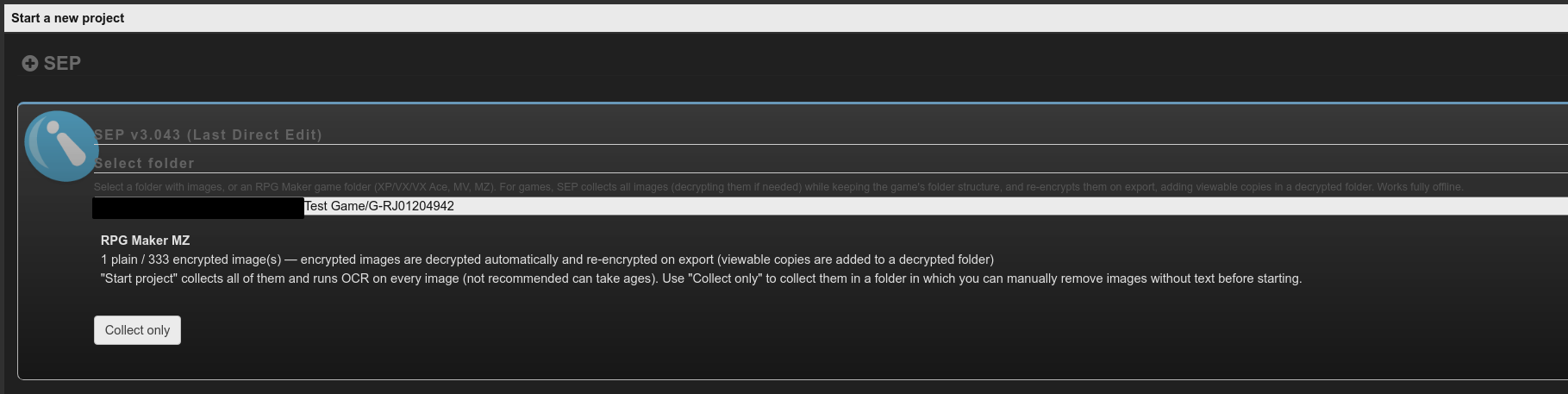
I've released v3.043.
SEP can now collect, decrypt, and encrypt pictures.
It's still somewhat experimental, but basically if you select a game folder instead of just a folder with images it will try to detect stuff.
I really do not recommend just running it on the whole game though.
usually less than 1% of the images actually have text, and just processing all would take ages and be full of hallucinated text.

SEP can now collect, decrypt, and encrypt pictures.
It's still somewhat experimental, but basically if you select a game folder instead of just a folder with images it will try to detect stuff.
I really do not recommend just running it on the whole game though.
usually less than 1% of the images actually have text, and just processing all would take ages and be full of hallucinated text.
- Aug 17, 2016
- 620
- 3,465
I think with 3.048 SLR Translator is kinda finished (again).
At least I'm out of ideas.
It covers all aspects of RPG Maker translation, even really niche stuff.
I'm sure there's still some bugs, but until someone actually reports them I guess my work is done.
At least I'm out of ideas.
It covers all aspects of RPG Maker translation, even really niche stuff.
I'm sure there's still some bugs, but until someone actually reports them I guess my work is done.
- Aug 17, 2016
- 620
- 3,465
In v3.049 I've added better support for reasoning.
It's not like it wasn't working. The options actually worked exactly as intended, it's just you couldn't really tell because it just discarded reasoning. It didn't even log it in the console on certain providers.
So on certain providers it was actually pretty hard to tell if it was reasoning or not.
Now it's very obvious because it actually streams the entire normalized response instead of just the live token count.
You can turn that off in the options though if you don't like it.
And it's not enabled for concurrent requests, because streaming like 20 responses into the UI at the same time sounds "a bit" silly.
It's not like it wasn't working. The options actually worked exactly as intended, it's just you couldn't really tell because it just discarded reasoning. It didn't even log it in the console on certain providers.
So on certain providers it was actually pretty hard to tell if it was reasoning or not.
Now it's very obvious because it actually streams the entire normalized response instead of just the live token count.
You can turn that off in the options though if you don't like it.
And it's not enabled for concurrent requests, because streaming like 20 responses into the UI at the same time sounds "a bit" silly.
- Aug 17, 2016
- 620
- 3,465
I've released v3.050.
This is the big roundup release now.
No new features, just addressing remaining bugs, completing the documentation, and fixing potential licensing issues, bloat, etc.
Basically just final polish.
It's now no longer a prototype. It's a finished product.
(But I will obviously still fix bugs if someone reports them.)
This is the big roundup release now.
No new features, just addressing remaining bugs, completing the documentation, and fixing potential licensing issues, bloat, etc.
Basically just final polish.
It's now no longer a prototype. It's a finished product.
(But I will obviously still fix bugs if someone reports them.)
- Aug 17, 2016
- 620
- 3,465
I've released v3.052.
Besides a few more cosmetic changes like a revamp of the "Raw" tab, I've tackled some untapped time save potential when using small kinda shit models.
A few versions ago I've implemented it streaming the response in the UI, I honestly only did that to make it less boring to look at. lol
But testing more models I realized how frustrating and slow it feels to watch a model get stuck in a loop repeating the same shit until it finally runs out of max_tokens and ends with a "length" finish reason.
So now instead it will periodically check the streamed content, and if it detects excessive repetition it will immediately go "STOP RIGHT THERE CRIMINAL SCUM", and terminate the fetch.
It will then retry the same way as if a length finish reason was reached. Meaning with an increase to the repeat_penalty, repetition_penalty, or frequency_penalty depending on which one is enabled. (Or just with a new prompt if none of them are.)
By default it counts 20+ repeated letters, 15+ repeated words/lines, or 4 repeated entries/terms as excessive repetition. All customizable in the options menu. (Change to 0 to turn off.)
Besides a few more cosmetic changes like a revamp of the "Raw" tab, I've tackled some untapped time save potential when using small kinda shit models.
A few versions ago I've implemented it streaming the response in the UI, I honestly only did that to make it less boring to look at. lol
But testing more models I realized how frustrating and slow it feels to watch a model get stuck in a loop repeating the same shit until it finally runs out of max_tokens and ends with a "length" finish reason.
So now instead it will periodically check the streamed content, and if it detects excessive repetition it will immediately go "STOP RIGHT THERE CRIMINAL SCUM", and terminate the fetch.
It will then retry the same way as if a length finish reason was reached. Meaning with an increase to the repeat_penalty, repetition_penalty, or frequency_penalty depending on which one is enabled. (Or just with a new prompt if none of them are.)
By default it counts 20+ repeated letters, 15+ repeated words/lines, or 4 repeated entries/terms as excessive repetition. All customizable in the options menu. (Change to 0 to turn off.)

EverPheasants
New member
- Feb 25, 2026
- 4
- 1
I'd like to suggest a new model for (potential) use in SLR Translator. Ling-3.0-tiny is a 7.9B, 1.3B-active MoE model. Fast, small, and -- perhaps most importantly -- available in uncensored models from fine-tuners I'm familiar with. SC117 even has recommendations for 6 and 8GB gpus, so maybe qwen3.5-4b might have some competition!?
Might.
In my small, initial tests the uncensored-abliterated version had trouble with DSLR's json output, though I've only tried the q4_k_m version and not any of the apex quants yet. Still, it's way faster than other stuff (legit 3x faster than my main squeeze Gemma4-12B) and the output was both better and less prone to explosions than actual-2B models I've tried. I was going to mess around with it some more, but I figured you have some more structured tests which can be run while I'm just throwing random stuff at it.
Might.
In my small, initial tests the uncensored-abliterated version had trouble with DSLR's json output, though I've only tried the q4_k_m version and not any of the apex quants yet. Still, it's way faster than other stuff (legit 3x faster than my main squeeze Gemma4-12B) and the output was both better and less prone to explosions than actual-2B models I've tried. I was going to mess around with it some more, but I figured you have some more structured tests which can be run while I'm just throwing random stuff at it.
- Aug 17, 2016
- 620
- 3,465
In my testing it failed to preserve placeholders even at modest amounts.I'd like to suggest a new model for (potential) use in SLR Translator. Ling-3.0-tiny is a 7.9B, 1.3B-active MoE model. Fast, small, and -- perhaps most importantly -- available in uncensored models from fine-tuners I'm familiar with. SC117 even has recommendations for 6 and 8GB gpus, so maybe qwen3.5-4b might have some competition!?
Might.
In my small, initial tests the uncensored-abliterated version had trouble with DSLR's json output, though I've only tried the q4_k_m version and not any of the apex quants yet. Still, it's way faster than other stuff (legit 3x faster than my main squeeze Gemma4-12B) and the output was both better and less prone to explosions than actual-2B models I've tried. I was going to mess around with it some more, but I figured you have some more structured tests which can be run while I'm just throwing random stuff at it.
My 2 best performing models are still https://huggingface.co/chenly124/Qwen3.5-4B-PaperWitch-heresy-Q8_0-GGUF as a tiny "better than nothing" option and https://huggingface.co/Furude0Rika/Gemma-4-26B-A4B-it-Uncensored-Apex-Quality as a seriously decent one.
Edit: There's also a DFlash draft model that works with paperwitch:
https://huggingface.co/z-lab/Qwen3.5-4B-DFlash
That boosts the speed quite a bit.
But honestly I wouldn't even bother with self hosting right now. Because you can just make a couple Ollama accounts and use the free "gemma4:31b-cloud" (That is Gemma 4 31B it at Q4) option.
Api Url is: "https://ollama.com/v1/chat/completions"
Even if you have high end consumer hardware using multiple of those at once is going to be faster than whatever you can manage, and unless you're going crazy with reasoning you're not ever going to hit the free limit.
Last edited:
- Aug 17, 2016
- 620
- 3,465
I've released v3.053.
Added a new DSLR option to move all variable content out of the system prompt and stuff it in a user prompt instead.
(Default OFF)
Why you would want that:
If your interference server/provider uses something like the KV cache Radix tree of SGLang it will cache your system prompt and if identical will pull it from cache instead of processing it again. Because the instructions are so long, on longer batch translations this can actually save a significant amount of time.
Also certain new models are actually specifically trained for long user prompt context now and "might" actually perform better.
Why you might not want that:
Old or small models struggle with huge user prompts. They respond better to context in the system prompt.
That means enabling this "could" cause those models to fail.
It might not improve speed at all, because your provider doesn't actually support it.
Added a new DSLR option to move all variable content out of the system prompt and stuff it in a user prompt instead.
(Default OFF)
Why you would want that:
If your interference server/provider uses something like the KV cache Radix tree of SGLang it will cache your system prompt and if identical will pull it from cache instead of processing it again. Because the instructions are so long, on longer batch translations this can actually save a significant amount of time.
Also certain new models are actually specifically trained for long user prompt context now and "might" actually perform better.
Why you might not want that:
Old or small models struggle with huge user prompts. They respond better to context in the system prompt.
That means enabling this "could" cause those models to fail.
It might not improve speed at all, because your provider doesn't actually support it.
- Aug 17, 2016
- 620
- 3,465
I've released v3.056.
Added new experimental QC/Judge system. (Default OFF)
The LLM will point out problems in its own translations, then judge the individual reports and write itself a correction prompt.
After that retry it will judge again, and determine if it improved. If it didn't, it will argue with itself to try to get it fixed.
How long this goes is customizable, if it's never happy it will tag the cell purple.
Does this actually improve translation quality?
Yes it does, even for paperwitch.
Then why is it not ON by Default?
Because it eats an insane amount of input tokens.
Do not enable that stuff unless you are using a free option, or you seriously don't care if you're billed 3x for a little higher translation quality.
Added new experimental QC/Judge system. (Default OFF)
The LLM will point out problems in its own translations, then judge the individual reports and write itself a correction prompt.
After that retry it will judge again, and determine if it improved. If it didn't, it will argue with itself to try to get it fixed.
How long this goes is customizable, if it's never happy it will tag the cell purple.
Does this actually improve translation quality?
Yes it does, even for paperwitch.
Then why is it not ON by Default?
Because it eats an insane amount of input tokens.
Do not enable that stuff unless you are using a free option, or you seriously don't care if you're billed 3x for a little higher translation quality.
- Aug 17, 2016
- 620
- 3,465
I've released v3.058.
The good news:
The QC/Judge system is now a lot more accurate and can actually seriously improve translation when using a capable model like Gemma4 31B.
The bad news:
Now it eats even more tokens than before and it turns out my test with paperwitch just looked better by random chance.
It did not "purposely" improve something.
Now that the system is actually fairly accurate it revealed that 9 out of 10 times it fails until it runs out of tries.
Meaning it just takes an insanely long time for very little quality gain.
I definitely do not recommend using the reviewer for a weak model or a model that bills you for input tokens. It's probably not worth it.
The good news:
The QC/Judge system is now a lot more accurate and can actually seriously improve translation when using a capable model like Gemma4 31B.
The bad news:
Now it eats even more tokens than before and it turns out my test with paperwitch just looked better by random chance.
It did not "purposely" improve something.
Now that the system is actually fairly accurate it revealed that 9 out of 10 times it fails until it runs out of tries.
Meaning it just takes an insanely long time for very little quality gain.
I definitely do not recommend using the reviewer for a weak model or a model that bills you for input tokens. It's probably not worth it.
- Aug 17, 2016
- 620
- 3,465
I've released v3.060.
Overhauled the UI. Often used buttons are now bigger, less used buttons are smaller or hidden.
The options menu now has a Quick Start card with just the options to get DSLR going.
Made the nightmode more coherent, no more flashbangs or random colors.
Improved QC/Judge a bit more.
Overhauled the UI. Often used buttons are now bigger, less used buttons are smaller or hidden.
The options menu now has a Quick Start card with just the options to get DSLR going.
Made the nightmode more coherent, no more flashbangs or random colors.
Improved QC/Judge a bit more.
- Aug 17, 2016
- 620
- 3,465
While testing 3.061 I had 4 local models translate the same map, and I thought I might as well share the result in case someone is curious how that turned out.
They were all Q8_0 or APEX Quality
Exact same settings and context.
Column 0: Original Text
Column 1: https://huggingface.co/mradermacher/abliterated-minicpm5-2b-GGUF
Column 2: https://huggingface.co/chenly124/Qwen3.5-4B-PaperWitch-heresy-Q8_0-GGUF
Column 3: https://huggingface.co/mradermacher/Huihui-NeoHorse-1-4B-abliterated-GGUF
Column 4: https://huggingface.co/Furude0Rika/Gemma-4-26B-A4B-it-Uncensored-Apex-Quality
The by far slowest model was actually NeoHorse1, because it needed an insane amount of retries. I really don't think using that with QC/Judge is a great idea.
MiniCPM5 was predictably the fastest, but the translation is ...not great.
The QC Judge system seems to work as intended now. (But is still disabled by default, so no one accidentally uses it with a premium model and spends way too much money.)
They were all Q8_0 or APEX Quality
Exact same settings and context.
Column 0: Original Text
Column 1: https://huggingface.co/mradermacher/abliterated-minicpm5-2b-GGUF
Column 2: https://huggingface.co/chenly124/Qwen3.5-4B-PaperWitch-heresy-Q8_0-GGUF
Column 3: https://huggingface.co/mradermacher/Huihui-NeoHorse-1-4B-abliterated-GGUF
Column 4: https://huggingface.co/Furude0Rika/Gemma-4-26B-A4B-it-Uncensored-Apex-Quality
The by far slowest model was actually NeoHorse1, because it needed an insane amount of retries. I really don't think using that with QC/Judge is a great idea.
MiniCPM5 was predictably the fastest, but the translation is ...not great.
The QC Judge system seems to work as intended now. (But is still disabled by default, so no one accidentally uses it with a premium model and spends way too much money.)
Attachments
Last edited:
- Aug 17, 2016
- 620
- 3,465
I've released v3.062 and several optional packs for it.
Because this is the "LM Studio? We got LM Studio at home!" update.
Introducing the DSLR Runtime Server!
That almost got named SGLongPP before I remembered I don't like python.
Basically you can now drop GGUF files into the data>llama>models folder and run them through SLR Translator itself.
But maybe actually don't.
I only really made this for consistent model testing and... because I can.
I would not assume this to actually be your best option, and I probably also will not constantly update it, so it's probably always going to be somewhat outdated.
But now I can really fully claim that this is offline and self contained, which is also why I used way too much time to get paperwitch re-uploaded so this is not dependent on huggingface either.
Because this is the "LM Studio? We got LM Studio at home!" update.
Introducing the DSLR Runtime Server!
That almost got named SGLongPP before I remembered I don't like python.
Basically you can now drop GGUF files into the data>llama>models folder and run them through SLR Translator itself.
But maybe actually don't.
I only really made this for consistent model testing and... because I can.
I would not assume this to actually be your best option, and I probably also will not constantly update it, so it's probably always going to be somewhat outdated.
But now I can really fully claim that this is offline and self contained, which is also why I used way too much time to get paperwitch re-uploaded so this is not dependent on huggingface either.
- Aug 17, 2016
- 620
- 3,465
Fixed a lot of issues with the new local runtime stuff in v3.063.
It's now consistently slightly faster than LM Studio on default settings, but not because I'm seriously claiming that it's better, but simply because the default settings are already better adjusted for the task.
The only thing you might notice is that loading a partially offloaded model is a lot slower. But once loaded it's actually processing prompts a lot faster.
It's now consistently slightly faster than LM Studio on default settings, but not because I'm seriously claiming that it's better, but simply because the default settings are already better adjusted for the task.
The only thing you might notice is that loading a partially offloaded model is a lot slower. But once loaded it's actually processing prompts a lot faster.
- Aug 17, 2016
- 620
- 3,465
I've released v3.065.
Significant improvements to the runtime server especially for draft model or multiple model setups.
It will now try to automatically pair MTP, DFlash or DSPark draft models with a suitable mate.
You can now set individual options per model instead of one global option.
It will now display a lot more information about the model in the options menu instead of expecting the user to know how many layers it has and stuff like that.
You can now also run it headless in case you want to use an LLM for something other than SLR Translator. I tested it for zcode for example.
Significant improvements to the runtime server especially for draft model or multiple model setups.
It will now try to automatically pair MTP, DFlash or DSPark draft models with a suitable mate.
You can now set individual options per model instead of one global option.
It will now display a lot more information about the model in the options menu instead of expecting the user to know how many layers it has and stuff like that.
You can now also run it headless in case you want to use an LLM for something other than SLR Translator. I tested it for zcode for example.
- Aug 17, 2016
- 620
- 3,465
For anyone confused how to get DSLR started:
It depends on your hardware. Unless you have an expensive GPU your best option will be to go to https://ollama.com/ and sign up for a free account. That will give you an api key.
Then start SLR Translator and open the options menu.
Scroll all the way down and click on Apply Custom Preset 2.

Then close the options and re-open them.
Fill in your api key.

Click the Test button and if it works you're done.

If you make multiple accounts and as a result got multiple api keys you can also add more endpoints to run at the same time for more speed and to avoid hitting a temporary limit in case your translation is very long.
If you have an expensive GPU or you really want it to be offline and you don't mind it taking a while you can also host a LLM yourself using the included runtime server. (Please make sure you are using v3.066 or later, I fixed a bunch of stuff.)
Choose a model you want to use and drop it in the data>llama>models folder.

Paperwitch with its DFLash model is just a low power example. There are obviously bigger better LLMs, but your hardware needs to be strong enough.
Next if you have an NVIDIA GPU you can get a bit more speed using CUDA, get the cuda package and just extract the included llama folder directly into SLR Translator.

If you have an AMD GPU you could bash your head against a wall and try to get ROCm running, or just use the already included Vulkan.
Next in the options menu of SLR Translator it should now detect the models you've put in the models folder.
Make necessary adjustments for the specific model you use and then click on "Start / Use local runtime".

Depending on the model this can now take a while to boot up.
Once done you can test it with the Test button and it should answer.

It depends on your hardware. Unless you have an expensive GPU your best option will be to go to https://ollama.com/ and sign up for a free account. That will give you an api key.
Then start SLR Translator and open the options menu.
Scroll all the way down and click on Apply Custom Preset 2.
Then close the options and re-open them.
Fill in your api key.
Click the Test button and if it works you're done.
If you make multiple accounts and as a result got multiple api keys you can also add more endpoints to run at the same time for more speed and to avoid hitting a temporary limit in case your translation is very long.
If you have an expensive GPU or you really want it to be offline and you don't mind it taking a while you can also host a LLM yourself using the included runtime server. (Please make sure you are using v3.066 or later, I fixed a bunch of stuff.)
Choose a model you want to use and drop it in the data>llama>models folder.
Paperwitch with its DFLash model is just a low power example. There are obviously bigger better LLMs, but your hardware needs to be strong enough.
Next if you have an NVIDIA GPU you can get a bit more speed using CUDA, get the cuda package and just extract the included llama folder directly into SLR Translator.
If you have an AMD GPU you could bash your head against a wall and try to get ROCm running, or just use the already included Vulkan.
Next in the options menu of SLR Translator it should now detect the models you've put in the models folder.
Make necessary adjustments for the specific model you use and then click on "Start / Use local runtime".
Depending on the model this can now take a while to boot up.
Once done you can test it with the Test button and it should answer.
Last edited:
- Aug 17, 2016
- 620
- 3,465
For v3.073 I've revisited the addon system.
It wasn't fully broken, but I basically ignored it's existence for quite a while.
It should now work properly again allowing drop in addons written in js.
Technically someone could add support for a new engine or whatever with it.
I don't really expect that to happen, but the docs shouldn't advertise an addon system if it doesn't even work.
To just repeat a note that was true from the start though.
T++ addons do NOT work. I do not use dreamsavior code.
If you try to drop in a T++ addon at best you get some very minor half broken functionality.
Usually you will get absolutely nothing.
And at worst it will destroy your entire app.
If you would for some reason want to use a T++ addon in SLRT you would first need to refactor it to the correct format.
It wasn't fully broken, but I basically ignored it's existence for quite a while.
It should now work properly again allowing drop in addons written in js.
Technically someone could add support for a new engine or whatever with it.
I don't really expect that to happen, but the docs shouldn't advertise an addon system if it doesn't even work.
To just repeat a note that was true from the start though.
T++ addons do NOT work. I do not use dreamsavior code.
If you try to drop in a T++ addon at best you get some very minor half broken functionality.
Usually you will get absolutely nothing.
And at worst it will destroy your entire app.
If you would for some reason want to use a T++ addon in SLRT you would first need to refactor it to the correct format.
- Aug 17, 2016
- 620
- 3,465
I've released v3.074.
Fixed the options menu still not saving some stuff permanently since the 3.069 save changes.
Added new "Ask DSLR" feature.
You can now ask your LLM questions in a chat window.
By default it's setup for a small local model at 32k context_length, which means the model only keeps the last 20 messages in memory and it's read tool calls are limited. You can change that in the options menu.
The accuracy of the answers is obviously dependent on what LLM you actually use, and this is not meant for serious research.
Trusting LLM output blindly is almost as bad as citing wikipedia as a source.
Because I gave the model the ability to read the SLR Translator documentation, answers regarding it will actually be fairly accurate, but I only really implemented that to test how tool use works and that function is obviously completely pointless.
Because obviously the first thing everyone does after starting SLR Translator for the first time, is reading the manual.
So absolutely nobody would ever have a reason to ask the LLM about something written there.
No exceptions whatsoever.
You wouldn't be a disappointment, would you?
Fixed the options menu still not saving some stuff permanently since the 3.069 save changes.
Added new "Ask DSLR" feature.
You can now ask your LLM questions in a chat window.
By default it's setup for a small local model at 32k context_length, which means the model only keeps the last 20 messages in memory and it's read tool calls are limited. You can change that in the options menu.
The accuracy of the answers is obviously dependent on what LLM you actually use, and this is not meant for serious research.
Trusting LLM output blindly is almost as bad as citing wikipedia as a source.
Because I gave the model the ability to read the SLR Translator documentation, answers regarding it will actually be fairly accurate, but I only really implemented that to test how tool use works and that function is obviously completely pointless.
Because obviously the first thing everyone does after starting SLR Translator for the first time, is reading the manual.
So absolutely nobody would ever have a reason to ask the LLM about something written there.
No exceptions whatsoever.
You wouldn't be a disappointment, would you?